For the complete documentation index, see llms.txt. Markdown versions of all docs pages are available by appending .md to any docs URL.
Migrating to ambient mesh from Istio in sidecar mode
Migrate from Istio sidecar mode to ambient mode with zero downtime using the Solo migration tool and Solo builds of Istio.
Solo Enterprise for Istio
The Solo ambient migration tool is intended as a starting point for your migration. For a free assessment or help planning your migration, reach out to Solo.
Considerations
The Solo ambient mesh migration tool provides a prescriptive path for migrating from Istio sidecar mode to ambient mode. Before beginning, review the following considerations.
Ambient architecture: Familiarizing yourself with ambient mode and its differences from sidecar mode is recommended before starting the migration.
- Review the conceptual documentation for an overview of the ambient architecture and key differences from sidecar mode.
- If you use authorization policies, understanding how authorization policies work in ambient mesh is important before starting the migration.
Platform prerequisites: Review the system and app requirements to determine whether any environment changes are needed before installing ambient mesh.
Note
The tool does not modify any configuration in your cluster. It only reads cluster state and suggests actions for you to review and apply. Following the tool’s recommendations in order allows migration without downtime, but the tool cannot account for every cluster configuration. Review all suggestions and test them before applying to a live cluster.
Solo Enterprise for Istio
Zero-downtime migration requires the Solo distribution of Istio. Use version 1.25 or later of the Solo distribution of Istio to ensure zero downtime during migration. The Solo distribution includes sidecar and ambient interoperability, which allows traffic to flow between sidecar-enabled workloads not yet migrated and ambient-enabled workloads using a waypoint proxy. Without the Solo distribution, the cluster experiences downtime between disabling sidecars and enabling ztunnel and waypoints.
Using the migration tool
-
Install the
glooCLI, which contains the migration tool.curl -sL https://storage.googleapis.com/gloo-cli/install.sh | sh - export PATH=$HOME/.gloo/bin:$PATH -
Start the migration by running
gloo ambient migrate. This command analyzes the cluster your kubeconfig context points to and recommends next steps across multiple phases.gloo ambient migrate
Solo Enterprise for Istio
Before starting the migration, use the free Ambient Estimator Tool to assess your Istio environment and estimate potential cost savings. Run gloo ambient estimate to gather cluster resource usage data, then upload the output to the Ambient Estimator Tool.
Review the following optional flags for the migrate command:
| Option | Description |
|---|---|
--enterprise | Include if you have a Solo Enterprise for Istio license, which is required for some ambient features available in the Solo distribution of Istio. If included, checks for those features in your cluster pass. |
--from-files | Read configuration from YAML files instead of a live cluster. Include all Istio APIs, all Gateway APIs, and the following Kubernetes APIs: Pod, DaemonSet, Deployment, ValidatingWebhookConfiguration, Namespace, Service, ConfigMap, Secret (optional). |
--ignore-failures | Run through all phases regardless of check failures. Useful during testing when you are aware of failures you want to skip. |
--output-dir | Directory to write generated files to, such as recommended policy and waypoint configurations. |
Migration phases
Each phase runs a series of checks that must pass before the tool advances. If a check fails, the tool explains how to resolve it.
Phase 1: Prerequisites
The pre-reqs phase inspects the cluster to verify it is ready for ambient mode, including the Kubernetes environment, the current Istio version, and compatibility of features used by the existing Istio installation. All existing istiod installations must:
- Run Istio version 1.25 or later
- Use the Solo distribution of Istio for zero-downtime migration
If an Istio version upgrade to 1.25 or later is required, you can optionally enable ambient mode during the upgrade in the next phase.
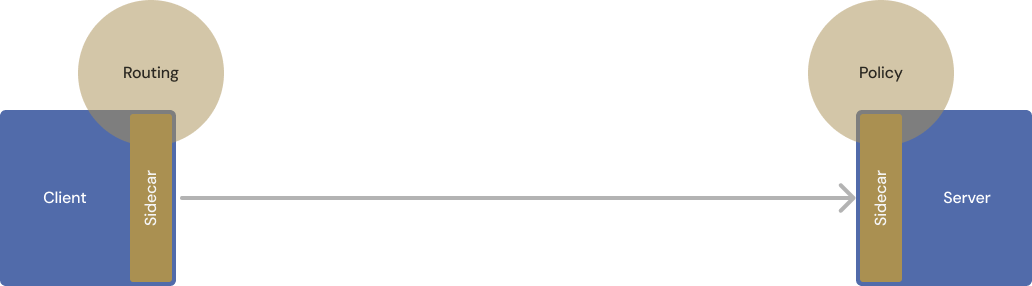
Example output for a cluster that is ready for ambient mode:
• Starting phase pre-reqs...
✅ Phase pre-reqs succeeded!
  ✅ Cluster CNI compatibility: passed
  ✅ Istio version compatibility: passed
  ✅ Multicluster usage compatibility: passed
  ✅ Virtual Machine usage compatibility: passed
  ✅ SPIRE usage compatibility: passed
Note
If you use revisions, you might see an error such as missing istiod istio-system/istiod even though an istiod deployment exists. Your istiod service may have the revision name appended, such as istiod-gloo, which the tool does not detect as the istiod service. You can skip this error and move to the next phase with gloo ambient migrate --ignore-failures.
Phase 2: Cluster setup
The cluster-setup phase verifies that your Istio installation has ambient mode enabled.
Note
Switching your Istio installation to ambient mode does not disable any existing sidecar functionality. Sidecar-enabled workloads continue to receive traffic.
Example output for a cluster that has the Kubernetes Gateway API CRDs installed but does not yet have ambient mode enabled or the CNI and ztunnel components deployed:
• Starting phase cluster-setup...
❌ Phase cluster-setup failed!
  ❌ Ambient mode enabled: failed. 1 error occurred:
    * istiod istio-system/istiod-main must have 'PILOT_ENABLE_AMBIENT=true'. Upgrade Istio with '--set profile=ambient'.


  ❌ DaemonSets deployed: failed. 2 errors occurred:
    * ztunnel not found
    * Istio CNI agent not found


  ✅ Sidecars support ambient mode: passed
  ✅ Required CRDs installed: passed
Enabling ambient mode
Follow the upgrade guide to switch your sidecar Istio installation to ambient mode. This allows workloads to be enrolled in the mesh and enables existing sidecars and gateways to communicate with ambient workloads.
Solo Enterprise for Istio
For the full upgrade steps using the Solo distribution of Istio, including license key configuration and the recommended Helm values, see the Solo Enterprise for Istio installation guide.
At minimum, set the following environment variables before running the Helm upgrade commands:
export ISTIO_VERSION=1.30.0
export ISTIO_IMAGE=${ISTIO_VERSION}-solo
export REPO=us-docker.pkg.dev/soloio-img/istio
export HELM_REPO=us-docker.pkg.dev/soloio-img/istio-helm
After upgrading, check the status of your Istio component pods:
kubectl get pods -n istio-systemRun the migration command again to verify the setup passes:
gloo ambient migrate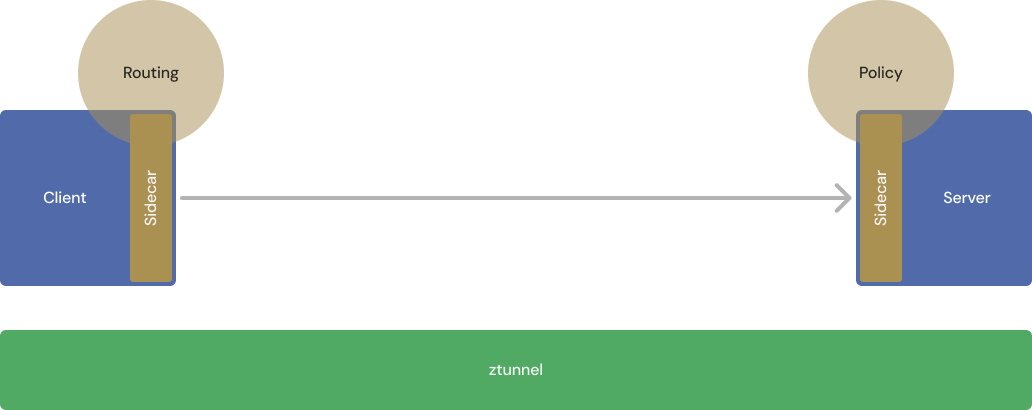
Phase 3: Waypoint deployment
The deploy-waypoints phase determines which services require waypoint proxies to retain their existing functionality.
Unlike sidecar mode, ambient mode lets you choose whether to apply Layer 7 policies for each service. The tool provides a best-effort analysis based on existing cluster policies, and generates suggested waypoint configuration for each recommendation.
Note
Deploying a waypoint does not yet activate it. Traffic does not route through the waypoint until you enable it in a later phase.
Review all recommended configurations carefully before applying. When in doubt, deploy the waypoint.
Review the following example scenarios:
- The tool may recommend a waypoint for a service with custom load balancing policies, since waypoints are required for custom load balancing. If the policy does not justify the overhead, you can skip the recommendation.
- The tool may not recommend a waypoint in cases where one would be beneficial. Sidecars provide mTLS, HTTP observability, and request-level load balancing. Ztunnel provides mTLS and optionally HTTP observability, but does not provide request-level load balancing. Applications that rely on request-level load balancing benefit from a waypoint even when the tool does not flag them.
Warning
Consistent hash load balancing in a DestinationRule has no effect in ambient mode. If you set trafficPolicy.loadBalancer.consistentHash in a DestinationRule, the hash policy is not applied to the waypoint. In sidecar mode, the client sidecar applies the ring hash as a source-side decision. In ambient mode, the waypoint processes traffic on the destination side and cannot make the same upstream selection, so path or header affinity is not enforced by any component in the ambient data path. The DestinationRule is accepted without an error or status condition, so the behavioral gap is not visible until you notice issues such as intermittent cache misses or inconsistent routing under load.
As a workaround, apply an EnvoyFilter to the waypoint to inject the hashPolicy on the relevant route.
Example output for a cluster where one waypoint is recommended:
• Starting phase deploy-waypoints...
⚠️ Phase deploy-waypoints has recommendations!
  🔮 Namespace "application" might require a waypoint for the following services:
     * Service "application/hello-world" depends on VirtualService "application/hello-world"

  ℹ️ Generated waypoints written to /tmp/istio-migrate/recommended-waypoints.yaml
The generated file contains the recommended waypoint configuration:
apiVersion: gateway.networking.k8s.io/v1
kind: Gateway
metadata:
  name: waypoint
  namespace: application
spec:
  gatewayClassName: istio-waypoint
  listeners:
  - name: mesh
    port: 15008
    protocol: HBONE
Apply the configuration through your deployment pipeline or with kubectl:
kubectl apply -f /tmp/istio-migrate/recommended-waypoints.yamlFor more information about configuring waypoints, see Configure waypoints.
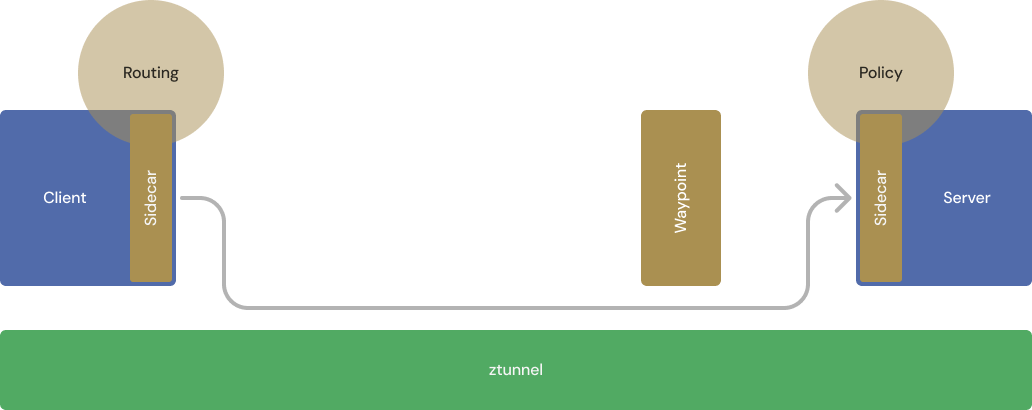
Phase 4: Policy migration
The migrate-policies phase determines which policies must be updated before being applied to waypoint proxies, and generates recommended policy configuration.
VirtualServices and DestinationRules that target services require no changes; the tool copies them as-is. Policies targeting specific workloads must be updated to target the waypoint instead. The tool generates recommendations for the following resource types:
- Telemetry
- WasmPlugin
- RequestAuthentication
- AuthorizationPolicy
- EnvoyFilter (when running with
--enterprise)
It also flags policies that are unsupported or unnecessary in ambient mode.
Example output in which authorization policy configuration is copied to new policies that apply to the waypoint:
• Starting phase migrate-policies...
⚠️ Phase migrate-policies has recommendations!
  🔮 Apply AuthorizationPolicy/app1/echo-from-waypoint: Service/app1/echo must allow traffic from its waypoint.
  🔮 Apply AuthorizationPolicy/app1/echo-legacy-policies: Existing configuration is copied from policy app1/legacy-policies to be enforced at the waypoint.
  🔮 Apply AuthorizationPolicy/app1/echo-policies: Existing configuration is copied from policy app1/policies to be enforced at the waypoint.
  🔮 Apply AuthorizationPolicy/app1/waypoint-allow-nothing: Existing configuration is copied from namespace policy app1/allow-nothing to be enforced at the waypoint.
  ℹ️ Recommended policies written to /tmp/istio-migrate/recommended-policies.yaml
Apply the generated policies through your deployment pipeline or with kubectl:
kubectl apply -f recommended-policies.yaml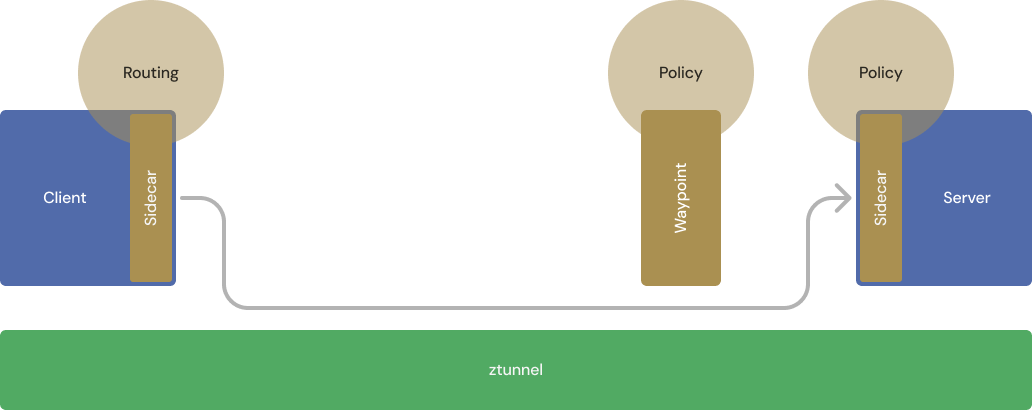
Authorization policies
Authorization policies require careful handling due to changes in how policies are enforced in ambient mode. In ambient mode:
- Layer 4 and Layer 7 policies can be enforced against services, applied at the waypoint.
- Layer 4 policies can also be enforced against workloads directly.
This requires the following changes:
- If a workload policy contains HTTP attributes, a waypoint is required, as recommended in the previous phase. The policy must target the waypoint rather than the workload.
- If a waypoint is deployed, the workload must allow traffic from the waypoint.
The tool copies authorization policies to the waypoints as required, and generates policies to allow traffic from the waypoints.
How recommendations are applied
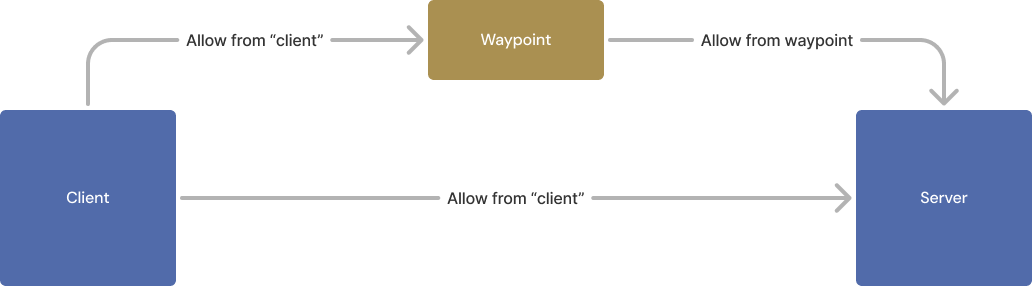
All policy recommendations at this phase are additions to the existing policies, not replacements. This preserves enforcement during migration, ensuring policies apply to all traffic regardless of whether it flows through a waypoint.
For example, consider authorization policies that deny all requests to apps in ns-bar, except from apps in ns-foo to app-bar:
apiVersion: security.istio.io/v1
kind: AuthorizationPolicy
metadata:
  name: allow-nothing
  namespace: ns-bar
spec:
  {}
---
apiVersion: security.istio.io/v1
kind: AuthorizationPolicy
metadata:
  name: legacy-policy
  namespace: ns-bar
spec:
  selector:
    matchLabels:
      app: app-bar
  rules:
    - from:
      - source:
          namespaces: ["ns-foo"]
When a waypoint is deployed, the tool generates additional policies that replicate the same behavior for traffic routed through the waypoint. No traffic is permitted to apps in ns-bar except requests routed by the namespace’s waypoint to app-bar, and the waypoint permits requests only from apps in ns-foo to app-bar:
# Existing configuration from namespace policy ns-bar/allow-nothing is copied to be enforced at the waypoint.
apiVersion: security.istio.io/v1
kind: AuthorizationPolicy
metadata:
  annotations:
    migrate.solo.io/source-policy: ns-bar/allow-nothing
  name: waypoint-allow-nothing
  namespace: ns-bar
spec:
  targetRefs:
  - group: gateway.networking.k8s.io
    kind: Gateway
    name: waypoint
---
# v1/Service/ns-bar/app-bar must allow traffic from its waypoint.
apiVersion: security.istio.io/v1
kind: AuthorizationPolicy
metadata:
  annotations:
    migrate.solo.io/source-service: app-bar
  name: app-bar-from-waypoint
  namespace: ns-bar
spec:
  rules:
  - from:
    - source:
        serviceAccounts:
        - waypoint
  selector:
    matchLabels:
      app: app-bar
---
# Existing configuration from policy ns-bar/legacy-policy is copied to be enforced at the waypoint.
apiVersion: security.istio.io/v1
kind: AuthorizationPolicy
metadata:
  annotations:
    migrate.solo.io/source-policy: ns-bar/legacy-policy
  name: app-bar-policies
  namespace: ns-bar
spec:
  rules:
  - from:
    - source:
        namespaces:
        - ns-foo
  targetRefs:
  - kind: Service
    name: app-bar
The two sets of policies together ensure that traffic restrictions for app-bar are enforced on both sidecar and waypoint paths, maintaining a zero-downtime transition:
Phase 5: Waypoint enablement
The use-waypoints phase detects which waypoints to enable and generates the required commands.
Once enabled, traffic flows through the waypoint. Enable waypoints one service at a time to monitor system health as you progress — there is no need to migrate all services simultaneously. If a service behaves unexpectedly, revert the waypoint label. For more information, see the waypoint configuration documentation.
Example output in which a previously deployed waypoint is ready to be enabled for namespace app1:
• Starting phase use-waypoints...
⚠️ Phase use-waypoints has recommendations!
  ⚠️ Waypoint app1/waypoint is not used by any services.
  🔮 Namespace app1 requires a waypoint, but is not configured to use one. To configure it: kubectl label namespace app1 istio.io/use-waypoint=waypoint
Apply the label to enable the waypoint:
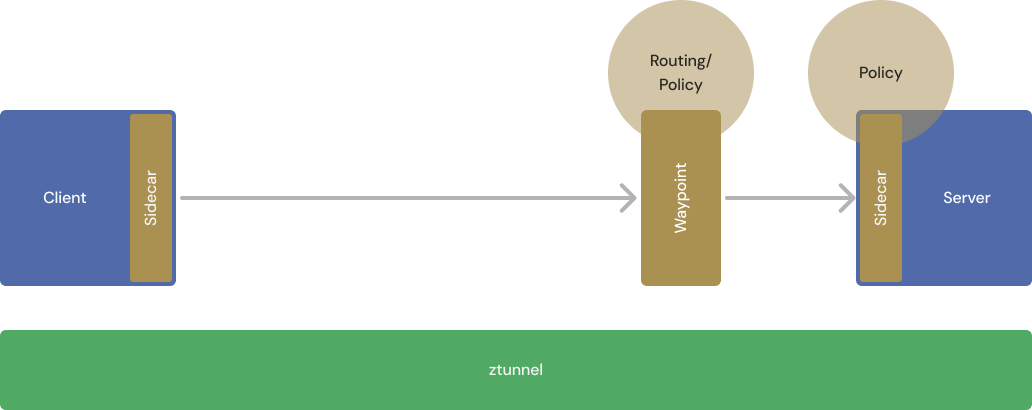
kubectl label namespace app1 istio.io/use-waypoint=waypointTraffic now flows from the client sidecar through the waypoint to the server sidecar, with each connection independently encrypted using mTLS:
Sequencing waypoint enablement and sidecar removal
Enable all waypoints before removing sidecars from workloads. This ordering is recommended but not strictly required, which allows flexibility when some workloads take longer to migrate.
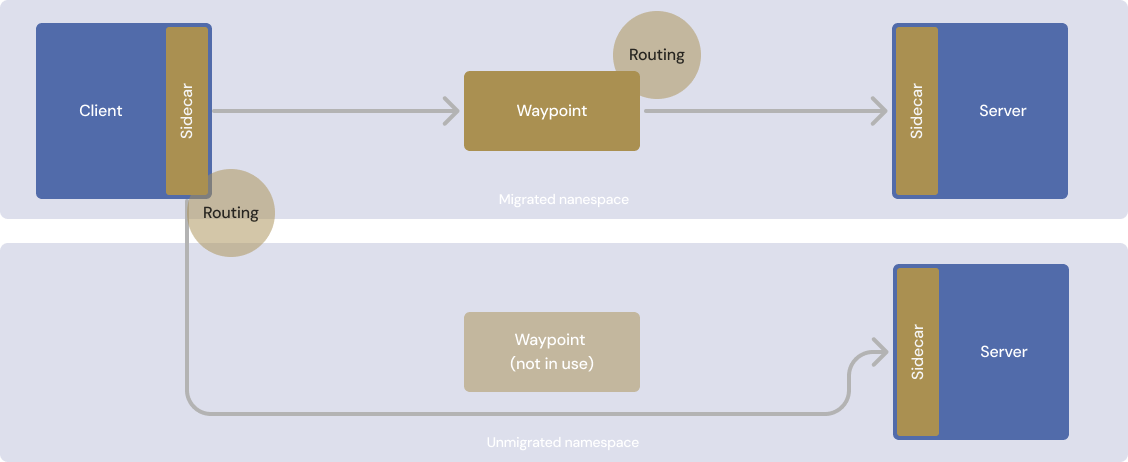
For policies to be correctly applied, request flows must go through either:
- A sidecar on both the client and server side, or
- An enabled waypoint proxy
Do not remove sidecars from a namespace while its clients still communicate with namespaces that have not yet completed migration.
The following diagram illustrates communication between a migrated and an unmigrated namespace during transition. Removing the client sidecar before the destination namespace is migrated causes some policies to be skipped:
Phase 6: Policy simplification
The policy-simplification phase suggests the safe removal of policies that targeted sidecars.
Because traffic now flows through enabled waypoints, the original sidecar-based policies replicated in the migrate-policies phase no longer apply to any traffic. The tool provides steps to safely clean up the now-unused policies.
Example output in which three sidecar-based authorization policies are ready for deletion:
• Starting phase policy-simplification...
⚠️ Phase policy-simplification has recommendations!
  🔮 AuthorizationPolicy is migrated and can be deleted: kubectl delete authorizationpolicies.security.istio.io -n app1 allow-nothing
  🔮 AuthorizationPolicy is migrated and can be deleted: kubectl delete authorizationpolicies.security.istio.io -n app1 legacy-policies
  🔮 AuthorizationPolicy is migrated and can be deleted: kubectl delete authorizationpolicies.security.istio.io -n app1 policies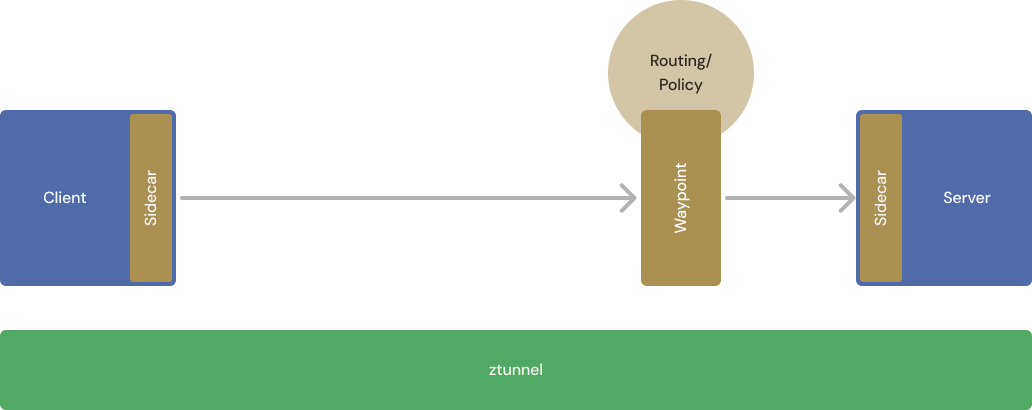
Phase 7: Sidecar removal
The remove-sidecars phase recommends steps to remove sidecars from any remaining workloads and enroll them in the ambient mesh.
At this point, all services that require waypoints have them configured with equivalent policy coverage. This phase detects workloads still running with sidecars and recommends moving them to ambient mode:
• Starting phase remove-sidecars...
⚠️ Phase remove-sidecars has recommendations!
  🔮 Sidecars can be safely disabled for namespace app1: kubectl label ns app1 istio-injection- istio.io/dataplane-mode=ambient
  ⚠️ Sidecar detected for pod app1/echo-7fb78cb7c5-plsjl
Apply the recommended command to disable sidecar injection and enroll the namespace in ambient mode:
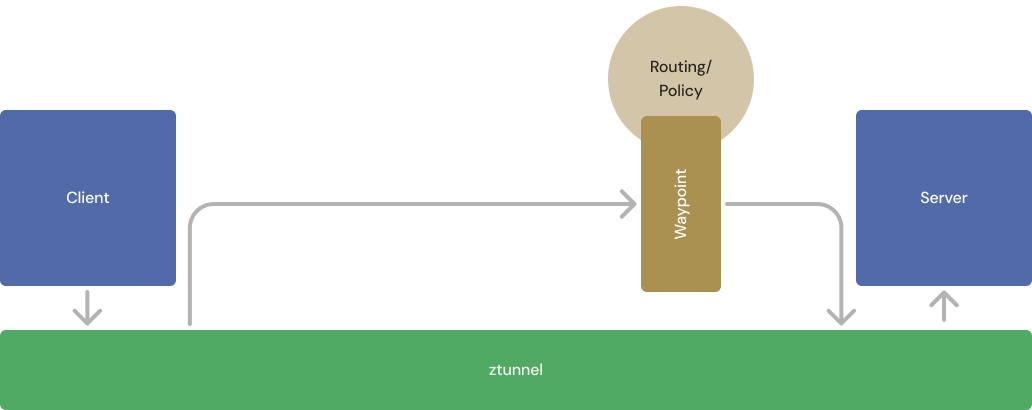
kubectl label ns app1 istio-injection- istio.io/dataplane-mode=ambientOn the next restart or redeployment, pods run without sidecars and ztunnel captures their traffic:
Egress controls after migration
The migration tool moves workloads from sidecar to ambient mode but does not automatically translate egress configuration. Sidecar egress patterns — such as exportTo-scoped ServiceEntry resources, outboundTrafficPolicy: REGISTRY_ONLY, and VirtualService-based egress gateways — behave differently in ambient mesh and require separate migration steps.
For a mapping of sidecar egress patterns to their ambient equivalents, see Migrate egress controls from sidecar to ambient.
Next steps
Solo Enterprise for Istio